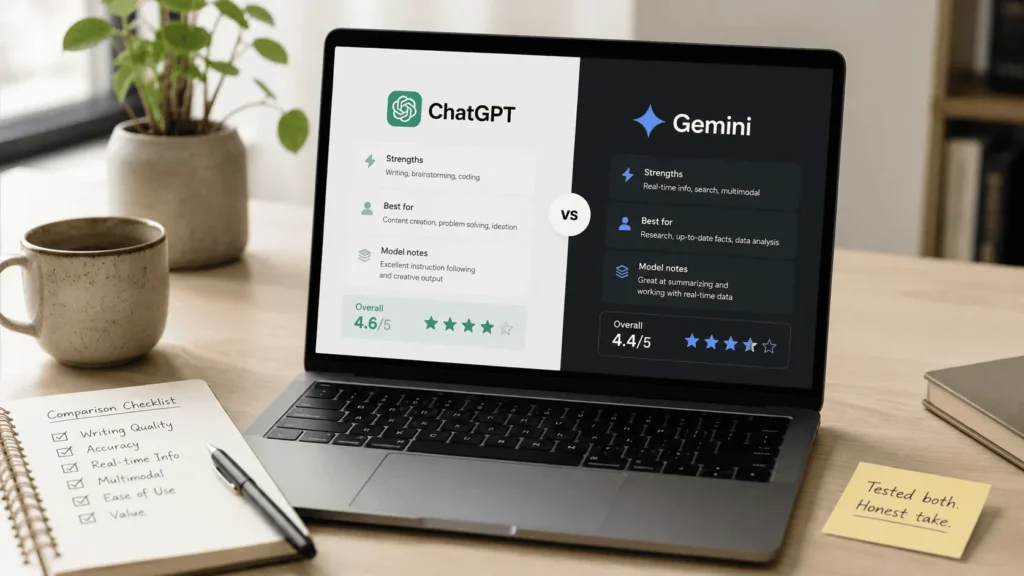
I have used both ChatGPT and Gemini seriously over the past year. Not as a quick test, but as real tools built into real work. Research, brainstorming, image generation, writing, coding exploration.
My verdict is clear: ChatGPT is more precise, more accurate, and more useful for most of what content creators and online professionals actually need.
But that is not the whole picture. Gemini has genuine strengths in specific areas that ChatGPT does not match. This honest chatgpt vs gemini comparison covers both sides so you can make the right choice for your situation.
ChatGPT vs Gemini at a Glance
| Feature | ChatGPT Free | ChatGPT Plus | Gemini Free | Gemini Advanced |
|---|---|---|---|---|
| Writing and precision | Good | Excellent | Average | Average |
| Brainstorming quality | Good | Excellent | Limited | Limited |
| Image generation | No | Yes (DALL-E) | Yes | Yes |
| Google Workspace | No | Limited | Excellent | Excellent |
| Coding assistance | Good | Good | Good (Studio) | Good |
| Pricing | Free | $20/month | Free | ~€20/month |
| Projects feature | No | Yes | No | Limited |
| Best for | Casual use | Power users | Google users | Workspace power users |
How I Came to Use Both Tools
My history with these tools is relevant to this comparison. I started using ChatGPT early and relied on it as my main AI assistant for research, brainstorming, and content work. I came to Gemini later, initially through videos about AI image generation, and tested it across several use cases over a sustained period.
The experience with both tools was long enough to form genuine opinions. Not based on a promotional trial, but on real work with real stakes.
ChatGPT: Precision and Brainstorming Quality
The clearest advantage ChatGPT has over Gemini is precision. When I ask ChatGPT a specific question or give it a specific task, the response reflects that specificity. The output is accurate, well-structured, and actionable.
For brainstorming in particular, ChatGPT operates at a level Gemini simply does not match in my experience. When I need to think through a problem, generate ideas for a new project, or explore directions I had not considered, ChatGPT holds a genuine dialogue. It builds on what I introduce, responds to pushback, and keeps the conversation moving toward something useful.
One important point from my full ChatGPT Plus review: you get the best results by engaging with it properly. Do not accept the first response. Push back, ask for alternatives, and build the conversation rather than treating it as a single-query tool. The results from a genuine dialogue are significantly better than a one-shot prompt.
ChatGPT Plus adds image generation through DALL-E, the projects feature for persistent context across sessions, and higher usage limits. For anyone using the tool professionally, the paid version is worth the cost.
Gemini: Where It Falls Short
When I tried Gemini for writing tasks, the gap in quality was noticeable. The specific moment that crystallised this for me was working on product descriptions for an Etsy store. I needed descriptions that were well-worded, natural, and optimised for search. What Gemini produced was technically correct but flat. The phrasing felt generic and the SEO angle was not well-executed.
I switched to ChatGPT for that task and the difference was immediate.
For brainstorming, Gemini is similarly underwhelming. The responses are less sharp, less contextually engaged, and less useful for thinking through complex problems than what ChatGPT produces in the same situation.
When Gemini was in earlier stages of development, the gap was even more significant. The tool has improved since, but for writing quality and conversational brainstorming, ChatGPT remains clearly ahead.
Our guide: Is Canva Pro Worth It? 7 Things I Tested Before Deciding
Where Gemini Genuinely Wins
This is an honest chatgpt vs gemini comparison, which means giving Gemini full credit where it earns it.
Google Workspace integration is Gemini’s clearest advantage. If your daily work happens inside Google Docs, Sheets, Slides, or Gmail, Gemini connects to those tools directly in a way ChatGPT currently does not. It can summarise documents, draft emails, build spreadsheet formulas, and create structured data tables with a level of detail that makes those tasks genuinely faster.
The spreadsheet creation capability is particularly strong. Ask Gemini to build a detailed sheet around a topic and it produces something well-structured and immediately usable. For anyone who spends significant time in Google Sheets, that specific capability adds real value.
Gemini’s image generation is also a functional feature. I used it for generating and editing PNG designs during a period when I was selling digital art. The outputs were workable for that purpose. For more precise and higher-quality AI image generation, I now use Leonardo AI, which produces noticeably superior results.
ChatGPT vs Gemini for Brainstorming
On brainstorming specifically, there is no close comparison. ChatGPT is the stronger tool by a clear margin.
Gemini can respond to brainstorming prompts and produce ideas. But the quality of the dialogue, the depth of the thinking, and the usefulness of what comes back does not match what ChatGPT produces when you engage with it properly.
For anyone who uses AI as a thinking partner, not just a content generator, ChatGPT is the right choice in this comparison.
ChatGPT vs Gemini for Image Generation
Both tools offer image generation in their paid tiers. ChatGPT uses DALL-E, Gemini uses its own image model.
The honest answer is that neither is the best option for serious AI image generation. If images are central to your workflow, a dedicated tool like Leonardo AI produces superior quality and more precise control than either ChatGPT or Gemini.
Between the two, ChatGPT Plus with DALL-E integrates more smoothly into a content workflow because the image generation lives inside the same conversation as your writing and brainstorming. Gemini’s image generation is more standalone in its feel.
ChatGPT vs Gemini for Google Workspace Users
If you live inside Google’s ecosystem, this comparison changes.
Gemini’s direct integration with Docs, Sheets, Gmail, and Slides is a genuine advantage that ChatGPT does not currently replicate. For users whose entire workflow happens in Google tools, Gemini adds value in a way that is difficult for ChatGPT to match without switching between applications.
The honest recommendation for Google Workspace users: use Gemini inside your Google tools where the integration adds value, and use ChatGPT for brainstorming, writing, and content tasks where quality matters more than ecosystem fit.
Who Should Choose ChatGPT
ChatGPT is the right choice if you:
- Need precise, high-quality output for writing and content tasks
- Use AI primarily for brainstorming, research, and idea generation
- Want image generation integrated directly into your AI assistant
- Work across multiple platforms rather than exclusively inside Google
- Are willing to learn how to engage with the tool properly for best results
Who Should Choose Gemini
Gemini makes more sense if you:
- Work primarily inside Google Docs, Sheets, Slides, and Gmail
- Need an AI that integrates directly with your existing Google Workspace tools
- Use AI for spreadsheet creation and document management rather than creative brainstorming
- Already pay for Google One and want Gemini Advanced included
Frequently Asked Questions
Is ChatGPT better than Gemini?
For writing quality, brainstorming, and general content creation, yes. ChatGPT produces more precise, more accurate, and more useful output for most content creator tasks. Gemini leads specifically in Google Workspace integration and spreadsheet creation. The right choice depends on where you spend most of your working time.
Can Gemini replace ChatGPT?
For most users, no. Gemini does not currently match ChatGPT’s precision or brainstorming quality. It can replace ChatGPT for specific Google Workspace tasks where the direct integration adds value. For general AI assistant use, ChatGPT remains the stronger tool in this chatgpt vs gemini comparison.
Which is better for writing product descriptions?
Based on direct experience writing descriptions for an Etsy store, ChatGPT produces significantly more natural, better-worded, and more SEO-aware descriptions than Gemini. For any writing task requiring precision and natural language, ChatGPT is the clear choice.
Is Gemini free?
Yes. Gemini has a free tier with functional image generation and Workspace integration. Gemini Advanced is the paid plan at approximately €20 per month, offering access to more powerful models and deeper integration features.
Should I use ChatGPT or Gemini if I already use Claude?
Claude remains my primary tool for coding, deep research, and long-form writing. For brainstorming and image generation, ChatGPT adds complementary value. Gemini adds value specifically if you work inside Google Workspace. Read my full Claude vs ChatGPT comparison for the complete picture on where Claude leads.
My Final Verdict: ChatGPT vs Gemini
After testing both tools across writing, brainstorming, images, and workspace tasks, the conclusion is clear.
For precision, brainstorming quality, and general content creation, ChatGPT wins. It is more accurate, more engaging as a thinking partner, and produces better output for the tasks that matter most to content creators and online professionals.
Gemini earns its place inside Google Workspace, where its integration genuinely changes how you work with Docs, Sheets, and Gmail. Outside of that ecosystem, it does not currently match what ChatGPT delivers.
The short answer: if you work online and need a capable AI assistant for content, research, and ideas, choose ChatGPT. If your entire workflow lives inside Google’s tools, add Gemini to the mix specifically for that context.
For anyone trying to build a full AI toolkit, check my complete list of best AI tools for content creators where both tools appear alongside everything else I use and recommend.
Our guide: Perplexity AI Review: Honestly Better Than Google for Research? (2026)
Josef Aaouam — Developer, web designer, and tool builder. I test tools as part of my real workflow and share honest verdicts at TriedTools.