I did not discover Google Gemini the way most people do. I did not read about it in a tech article or see it announced on social media. I found it through YouTube — watching videos about AI image generation — and decided to try it myself.
What followed was a journey through four different use cases over several months. Some impressed me. One frustrated me enough to remember exactly why. And one surprised me with capabilities I did not expect from a Google product.
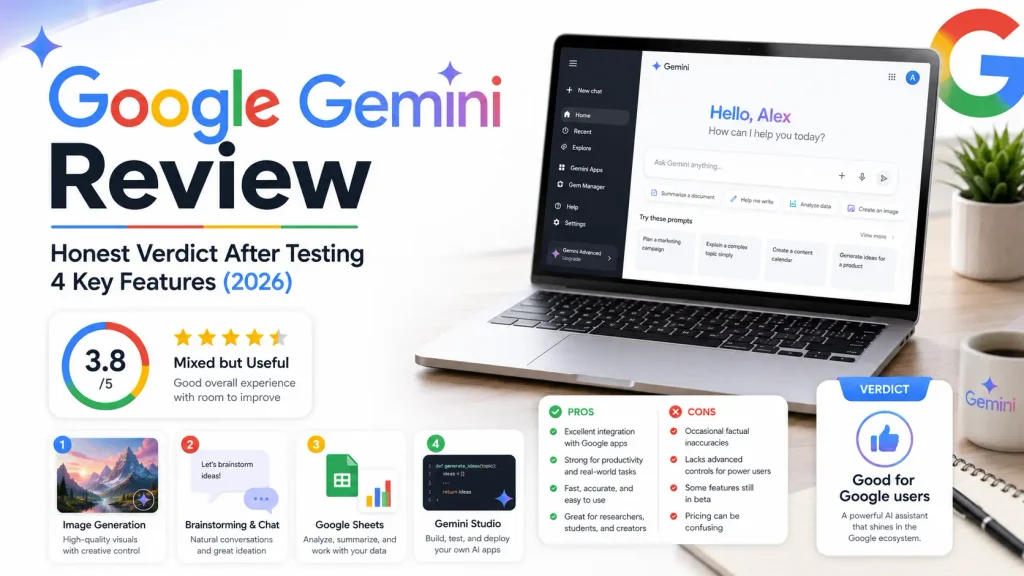
This is my honest Google Gemini review — covering images, brainstorming, coding, and spreadsheets — based on real use rather than a quick demo.
Google Gemini at a Glance
| Feature | Gemini Free | Gemini Advanced | Claude | ChatGPT |
|---|---|---|---|---|
| Writing and descriptions | Average | Average | Excellent | Very Good |
| Image generation | Yes | Yes | No | Yes (DALL-E) |
| Google Workspace integration | Excellent | Excellent | None | Limited |
| Coding — Gemini Studio | Good | Good | Excellent | Good |
| Spreadsheet creation | Excellent | Excellent | Good | Good |
| Brainstorming quality | Limited | Limited | Excellent | Very Good |
| Price | Free | ~€20/month | Free/Pro | Free/Plus |
How I Started Using Gemini
As I explain throughout this Google Gemini review, my first use of the tool was entirely focused on image generation. I was selling PNG designs for T-shirts at the time — digital art files for print-on-demand — and I was looking for an AI tool that could help me generate and edit the designs quickly.
Gemini worked reasonably well for that specific task. The image generation was capable enough for the kind of stylised designs I needed, and the editing features gave me some flexibility over the output. For someone starting to explore AI image tools, it was a useful introduction.
From there I moved into using Gemini for conversation and brainstorming — and that is where my experience became more mixed. Then I discovered Gemini Studio for coding, which genuinely surprised me. And somewhere along the way I found that Gemini handles Google Sheets better than almost any AI tool I have used.
Four features. Four very different experiences. Here is each one honestly.
Feature 1: Image Generation — Capable But No Longer My Choice
When I was generating images for T-shirt PNG designs, Gemini served a purpose. The quality was reasonable for commercial design work, the editing features gave me control over the output, and the integration with Google’s broader ecosystem made the workflow relatively smooth.
I no longer use Gemini for images. Not because it became worse — but because dedicated tools have moved ahead. For serious AI image generation, I now use Leonardo AI, which produces noticeably superior precision and detail for professional work. If image quality matters to your workflow, that comparison is worth reading.
Gemini’s image generation is a solid option for casual or occasional use. For anyone building a professional image workflow, there are stronger dedicated alternatives.
Feature 2: Brainstorming and Chat — Where Gemini Disappoints
This is the section of this Google Gemini review that most promotional content avoids entirely.
I tried Gemini for brainstorming and general conversation, and I found it genuinely underwhelming compared to the alternatives I use daily. The responses feel less sharp, less contextually aware, and less useful for thinking through complex problems than Claude or ChatGPT.
The specific moment that crystallised this for me was trying to use Gemini to write product descriptions for my Etsy store — the PNG designs I was selling at the time. I needed descriptions that were well-worded, SEO-optimised, and appealing to buyers. What Gemini produced was technically correct but felt flat. The wording was not natural enough, the SEO framing was generic, and the descriptions did not feel like something that would actually sell a product.
I switched to Claude and ChatGPT for that task and the difference was immediately clear. For writing that needs to engage, persuade, or rank — Gemini is not the right tool in my experience.
Feature 3: Google Sheets — A Genuine Strength
Here is where my Google Gemini review takes a positive turn.
Ask Gemini to create a spreadsheet and it performs significantly better than you might expect based on its text generation weaknesses. It builds well-structured sheets, includes relevant columns and data categories, formats things sensibly, and produces something you can actually use as a starting point for real work.
If you spend time inside Google Workspace — Docs, Sheets, Slides, Gmail — Gemini’s integration is a genuine advantage. It understands the context of your documents, can summarise long content, draft responses, build formulas, and create structured tables with a level of detail that makes the task faster.
This is where Gemini earns its place. Not as a replacement for Claude or ChatGPT as general AI assistants — but as an AI layer built into the tools you are already using all day inside Google’s ecosystem.
Feature 4: Gemini Studio for Coding — The Unexpected Highlight
The biggest surprise in my Google Gemini experience was Gemini Studio.
I came to it without high expectations. I had already been using Claude for coding and development work — which I covered in my full Claude vs ChatGPT comparison — and I did not expect Gemini to add much.
But Gemini Studio is a genuinely capable environment for exploring AI-assisted coding. I used it to learn, experiment, and understand concepts I had not fully grasped elsewhere. The interface is built for developers, the model handles code with reasonable precision, and for learning and prototyping it provided real value.
I would not replace Claude with Gemini Studio for serious development work — Claude’s depth and context retention remain superior for complex projects. But for learning, exploring new coding concepts, and quick experiments, Gemini Studio is worth knowing about.
Is Gemini Redundant If You Already Use Claude or ChatGPT?
This Google Gemini review would not be complete without answering the most practical question directly — and my honest answer is: for most people, yes.
If you are already using Claude and ChatGPT effectively, Gemini does not add much for writing, brainstorming, or content creation. Those two tools cover those tasks better. My full breakdown of Claude and ChatGPT explains exactly where each one leads.
Where Gemini is not redundant is in Google Workspace integration. If your daily work happens inside Google Docs, Sheets, Slides, or Gmail, Gemini connects to those tools directly in a way Claude and ChatGPT currently do not. That specific integration is Gemini’s clearest unique value.
Beyond that, if you do not live inside Google’s ecosystem — Gemini becomes much harder to justify when stronger alternatives exist for most of its other use cases.
Who Should Use Google Gemini
Google Gemini review makes sense if you:
- Work primarily inside Google Workspace and want AI built directly into Docs, Sheets, and Gmail
- Need a capable spreadsheet and document creation assistant
- Want to explore AI-assisted coding through Gemini Studio
- Use AI for image generation and prefer staying inside Google’s ecosystem
- Are already paying for Google One and get Gemini Advanced included
Our guide: Is Canva Pro Worth It? 7 Things I Tested Before Deciding
Who Should Choose Alternative Tools
Consider Claude or ChatGPT instead if you:
- Need high-quality text generation, brainstorming, or product descriptions
- Work on serious development projects requiring deep coding assistance
- Want an AI tool that produces engaging, persuasive, or SEO-focused writing
- Do not work heavily inside Google Workspace
For image generation specifically, tools like Leonardo AI produce higher quality results with more precise control.
Frequently Asked Questions
Is Google Gemini free to use? Yes. Google Gemini has a free tier that gives you access to the standard model including text generation and image creation. Gemini Advanced is the paid tier at approximately €20 per month, offering access to more powerful models and deeper Workspace integration.
Is Google Gemini better than ChatGPT? For most writing and brainstorming tasks, no — in my experience ChatGPT produces stronger output. Gemini has a clear advantage in Google Workspace integration and spreadsheet creation. The right choice depends on where you spend most of your working time.
Is Google Gemini good for SEO writing? Based on my experience using it for Etsy product descriptions, Gemini’s writing output for SEO-focused content is below what Claude and ChatGPT produce. The phrasing felt generic and less natural than what dedicated content AI tools provide.
What is Gemini Studio? Gemini Studio — also called Google AI Studio — is a developer-focused environment for building with and experimenting with Google’s AI models. It is more technical than the standard Gemini interface and genuinely useful for learning coding concepts and prototyping AI-powered features.
Should I use Gemini if I already use Claude? If you work inside Google Workspace daily, yes — Gemini adds value there that Claude does not currently match. For general writing, research, and content creation, Claude handles those tasks better and Gemini would be largely redundant. Most users in my position — covered in my best AI tools for content creators list — find Claude and ChatGPT sufficient without needing Gemini.
My Final Verdict: Google Gemini Review
To close this Google Gemini review: it is a tool of genuine contrasts, strong in some areas, noticeably weak in others, and most valuable for a specific type of user.
The Google Workspace integration is real and useful. The Sheets capability is better than expected. Gemini Studio offers genuine value for coding exploration. These are areas where Google has built something that earns its place.
The writing and brainstorming weaknesses are equally real. If you need descriptions, content, or persuasive text — Gemini is not the tool I would reach for. The Etsy experience showed me clearly that for writing that needs to work, the alternatives perform better.
Use Gemini inside Google’s ecosystem and it makes sense. Use it as your primary AI writing tool and you will likely be disappointed.
I hope this Google Gemini review has helped you make an informed decision.
Our guide Canva vs Adobe Express: Honest Comparison From a Daily Canva User (2026)
Josef Aaouam — Developer, web designer, and tool builder. I test tools as part of my real workflow and share honest verdicts at TriedTools.